
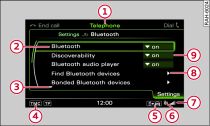
- Fig. 1 Telephone settings
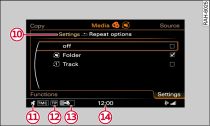
- Fig. 2 Media settings
After pressing a function selector button Link, the corresponding menu will appear on the MMI display.
(A)
(B) Symbol / marking
(C) Explanation
(B) Symbol / marking
(C) Explanation
| (A) |
(B) |
(C) |
|---|---|---|
| -1- |
Heading |
Indicates the selected mode (e.g. Radio). |
| -2- |
Selected option |
A selected item is framed. |
| -3- |
Arrows
pointing up/down |
Indicate further menu options (next/previous page). |
| -4- |
TMC/TMCpro symbol |
Reception of TMC/TMCpro traffic messages Link. |
| -5- |
Telephone status display |
Indicates import/update of contacts in the directory/call lists. |
| -6- |
Bluetooth symbol |
Active Bluetooth connection. |
| -7- |
Signal strength indicator |
Reception strength of mobile phone network. |
| -8- |
Arrow |
Indicates more selection or setting possibilities. |
| -9- |
Selection box |
Selection possibilities for selected item. |
| -10- |
Path/subheading |
Indicates the path to the selected function/informs about the selected function. |
| -11- |
Mute symbol |
The current audio/video source is muted. |
| -12- |
TP symbol |
Reception of traffic reports Link. |
| -13- |
Display of copying process status |
Audio/video files are being copied to the jukebox Link. |
| -14- |
Time |
Time set. |