
|
-
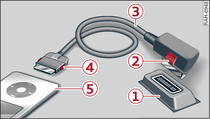
- Fig. 1 Connecting a portable player
The Audi music interface is located in the centre console beneath the centre armrest.
- To connect an adapter cable: Connect the adapter cable* -3- Fig. 1 to the Audi music interface -1- before connecting the portable player -5- (e.g. iPod).
- To disconnect the adapter cable from the Audi music interface: With the release tab -2- pressed, pull the connector off the Audi music interface.
- To disconnect the iPod adapter cable/iPod adapter cable plus* from an iPod: With the release tabs -4- pressed, pull the iPod connector out of the iPod.
Depending on the device you are using, the media are started and operated using the portable player or the MMI system
►Link.
Caution!
- To avoid damaging the connection, please take care when detaching the connector from the Audi music interface.
- Very high or very low temperatures (a common occurrence in a car's interior) can cause damage to portable players and/or impair their performance. Please do not leave your portable player in the vehicle in case of extreme temperatures.
Note
- Do not use USB extension cables or adapters as these cause performance issues.
- It cannot be guaranteed that portable players which do not meet the specification USB 2.0 will function via the MMI.
- USB hubs are not supported.
- The iPod/iPhone/iPad battery is charged via the iPod adapter cable/iPod adapter cable plus* when the device is connected to the Audi music interface and the ignition is switched on.
- Use only the iPod adapter cable/iPod adapter cable plus* with red/blue markings to connect an iPod/iPhone/iPad.
- Some iPod versions (e.g. iPod shuffle) cannot be connected with the iPod adapter cable/iPod adapter cable plus*. You can connect these devices using the optional adapter cable with 3.5 mm jack plug*.
- Some of the iPod's control functions are not supported, such as rating tracks, Cover Flow or adding tracks to "on-the-go" playlists. The iPod can only display covers and play videos if it is connected via an iPod adapter cable plus* (red markings).
- If you would like to play videos, you can also connect your iPod to the Audi music interface with the AV adapter cable*. You will also require an Apple AV cable. Please refer to the iPod operating instructions for more information on Apple AV cables.
- The new Apple connector (Lightning connector) does not support video playback.
- For more information on the Audi music interface and on which devices are supported, please go online (e.g. www.audi.com/mp3 or www.audi.com/bluetooth) or contact an Audi dealer.
- iPod/iPhone/iPad malfunctions also affect the operation of the MMI. In this case, please reset your iPod/iPhone/iPad.
- Please refer to the iPod/iPhone/iPad operating instructions for important information on how to use your iPod/iPhone/iPad. We recommend that you update the iPod/iPhone/iPad software to the latest status.