
|
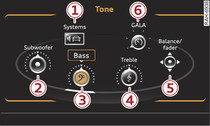
You can adjust the sound and volume of the MMI individually. The settings depend on the equipment fitted in your vehicle.
Select: MENU button > Tone.
-1- Systems
The volume of the Telephone* and Navigation* functions, the Speech dialogue system*, the Traffic announcements and the Parking aid* can be adjusted individually
►Link.
-2- Subwoofer* / -3- Bass / -4- Treble
You can adjust the Subwoofer*, Bass and Treble settings by turning the rotary pushbutton. New settings apply only to the currently activated audio source, allowing the settings of each audio source to be adjusted individually.
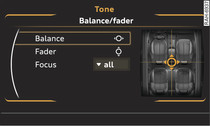
-5- Balance/fader (sound focus)
- To set the left/right volume ratio: Select and confirm Balance. Turn the rotary pushbutton clockwise or anti-clockwise to the desired position.
- To set the front/rear volume ratio: Select and confirm Fader. Turn the rotary pushbutton clockwise or anti-clockwise to the desired position.
- To set the volume ratio using MMI touch: Move your finger in the desired direction on the MMI touch pad.
- To set the sound focus*: Select and confirm Focus > all (evenly distributed sound focus)/front/rear (sound focus distributed evenly in front/rear interior of vehicle).
-6- GALA (speed-dependent volume control)
You can adjust the automatic volume adaption to the interior noise level by turning the rotary pushbutton.
Surround*
Turn the rotary pushbutton to adjust the volume of the surround effect.