
|
|
Applies to: vehicles with analogue instrument cluster
You can use the multi-function steering wheel to control the driver information system and certain MMI functions and to adjust the volume.
-
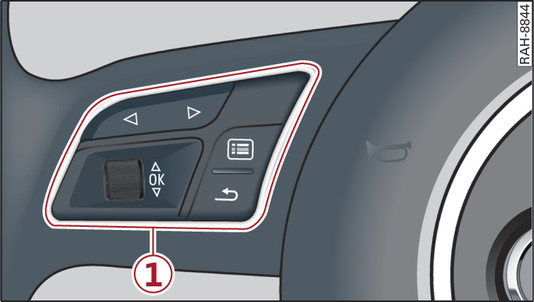
- Fig. 13 Left side of multi-function steering wheel
-
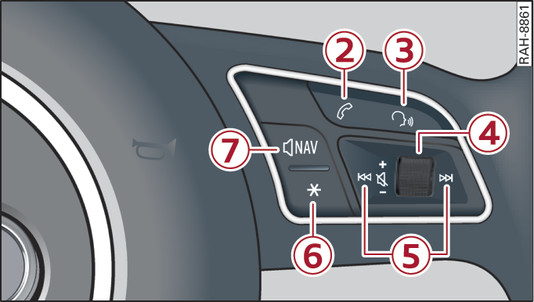
- Fig. 14 Right side of multi-function steering wheel
Important: The ignition must be switched on.
-1- How to use the driver information system
The equipment installed on your vehicle determines which of the following tabs are available:
|
1st tab
|
On-board computer link►
|
|
2nd tab1)
|
Driver messages
|
|
3rd tab
|
|
|
4th tab
|
Telephone*
link►
|
|
5th tab
|
Navigation*
link►
/div>
|
- To switch between tabs: Press the

 button repeatedly until the desired tab is displayed.
 - To call up/close a menu: Press the
 button.
 - To select a function in a menu/list: Scroll the left thumbwheel to the desired function.
- To confirm the selection: Press the left thumbwheel to confirm your selection.
- To return to the previous function level: Press the
 button.
 - To scroll through lists: Scroll the left thumbwheel quickly.
-2-
 button
button- To answer a call: Press the
button when there is an incoming call.
- To end a call: Press the
button during a call.
- To display the call list: Press the
button while no calls are active and there are no incoming calls.
-3-
 button
button- To switch on the speech dialogue system: Briefly press the
button. Give a spoken command after the beep signal.
- To switch off the speech dialogue system: Press and hold the
button for several seconds. Or: Say the command Cancel.
For more information about the speech dialogue system, refer to link►
.
-4- Right thumbwheel
You can adjust the volume of an audio source or system message (e.g. during a speech dialogue) directly while it is being played.
- Volume up/down: Scroll the right thumbwheel up/down.
- Mute/pause: Scroll the right thumbwheel down. Or: Press the right thumbwheel.
- Unmute/resume: Scroll the right thumbwheel upwards. Or: Press the right thumbwheel.
-5-
 /
button
/
button
/
button- To select the previous/next track or station: Press the
or
button.
- To fast forward/rewind an audio file: Press and hold the
or
button until the desired playing position has been reached.
-6-
 button / steering wheel heating*

button / steering wheel heating*
- Steering wheel heating*: For further information refer to link► .
- To call up the user-assigned function: Press the
button on the multi-function steering wheel.
- To check which function is assigned: Press and hold the
button.
- To change the assigned function: Select: MENU button > Car > left control button > Vehicle settings > Steering wheel button.
-7-
 button
button- To have the last navigation cue repeated: Press the
button while route guidance is active.
- To adjust the volume of the navigation cues: Scroll the right thumbwheel up/down during route guidance while a navigation cue is being spoken.