
Instruction book AUDI Q7 VERSION OF YEAR 2015
Engine Oil 1L Longlife - Audi Fleecejacke - Audi Mug -  Audi Beanie - Audi all-weather floor mats -  Genuine Audi Interior Cargo Organizer
►Audi Q7 ►Infotainment ►Multi Media Interf... ◀MMI touch
Applies to: Audi Q7s with MMI touch
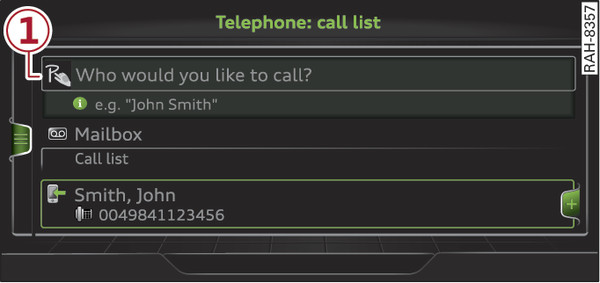
Fig. 201 Display when MMI touch is active
Fig. 202 Entering a navigation destination via the MMI touch pad
The MMI touch pad Fig. 202► is located between the control buttons.
Important: A function requiring text or number input must be active and the symbol -1- Fig. 201► must be shown on the display.
  • Basic principle: Use your finger to write an individual letter (capital or small letters) or numbers/symbols on the MMI touch pad. If the system positively identifies a character, it will be shown on the infotainment display -2- Fig. 202► and may be confirmed acoustically.
  • To enter a space: Move your finger from left to right across the MMI touch pad.
  • To delete a character: Move your finger from right to left across the MMI touch pad.
  • To use the suggestion: Press the rotary pushbutton.
  • To switch directly to the results list: Turn the rotary pushbutton to the right.
  • To enter Cyrillic characters: Press the right control button. Select and confirm Switch to Cyrillic characters.
  • To open the speller: Press the right control button. The speller will be opened. Text and numbers can be entered via the speller link►.
Engine Oil 1L Longlife - Audi Fleecejacke - Audi Mug -  Audi Beanie - Audi all-weather floor mats -  Genuine Audi Interior Cargo Organizer

All images, logos and text are property of © Audi. This site has no relationship with the company Volkswagen - Audi Spain nor any of its affiliates worldwide. For more information. To contact the author of this website click here.