
-
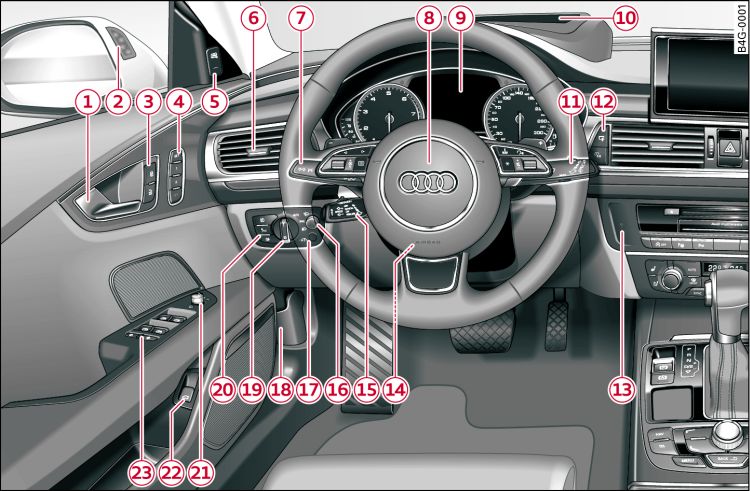
- Fig. 1 Front cabin: Left side
-
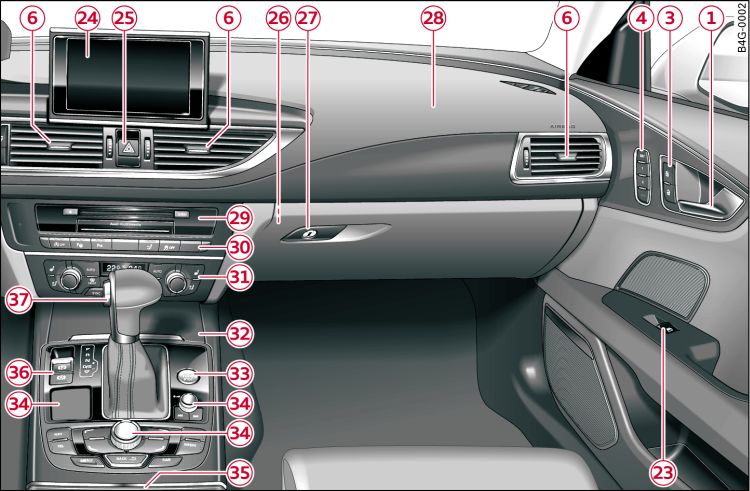
- Fig. 2 Front cabin: Right side
| -1- | Door handle |
| -2- | Warning lamp for Audi side assist |
| -3- | Central locking switch |
| -4- | Buttons for memory function* |
| -5- | Button for Audi side assist |
| -6- | Air outlets with thumbwheel |
| -7- |
Control lever for:
|
| -8- |
Multi-function steering wheel with:
|
| -9- | Instrument cluster |
| -10- | Head-up display* |
| -11- | Control lever for windscreen wipers and washer |
| -12- |
Controls for:
|
| -13- | Starting the engine after a malfunction |
| -14- |
Steering wheel adjustment, depending on equipment fitted:
|
| -15- |
Control lever for:
|
| -16- | Button for switching head-up display* on/off and adjusting height |
| -17- | Instrument lighting |
| -18- | Bonnet lock release |
| -19- | Light switch |
| -20- |
Switches for:
|
| -21- | Electric adjuster for exterior mirrors |
| -22- | Switch for unlocking the boot lid |
| -23- | Electric windows |
| -24- | MMI display |
| -25- | Hazard warning lights |
| -26- | Deactivating front passenger's airbag* |
| -27- | Glove box |
| -28- | Front passenger's airbag |
| -29- | Media drives (MMI) |
| -30- |
Switches/warning lamps for:
|
| -31- |
Air conditioner, depending on equipment fitted:
|
| -32- |
Storage compartment or ashtray*
with cigarette lighter*
|
| -33- | START ENGINE STOP button |
| -34- | MMI control console |
| -35- |
Cup holder, 12 Volt socket*
|
| -36- |
Switches for:
|
| -37- |
Selector lever (automatic gearbox) for the following (as
applicable):
|
Note
- Depending on the equipment fitted in your vehicle the display screen in the instrument cluster is either monochrome or multi-coloured. As the two displays are more or less identical this Owner's Manual uses the multi-coloured displays for illustration purposes.
- Some of the items of equipment listed in this section are only fitted on certain models or are optional extras.
- Please refer to the separate operating manual for instructions on using the Multi Media Interface (MMI).
- The arrangement of switches and controls on right-hand drive models* may be slightly different from the layout shown on Link. However, the symbols used to identify the controls are the same.